Claude Code launched as a terminal-first AI coding assistant. But the real power is not in the base tool. It is in the community-built skills that extend it into specialized workflows. Blog writing, SEO auditing, image generation, content scoring, schema markup - developers have built open-source skills for all of it.
This guide covers the Claude Code skills that actually matter in 2026. Not every skill on GitHub is worth installing. We tested dozens and narrowed it down to the ones that deliver real results, are actively maintained, and cost nothing to use.
What are Claude Code skills?
A Claude Code skill is a package of prompts, instructions, and scripts that adds specialized capabilities to your Claude Code CLI. Think of them as plugins for your terminal AI assistant. Each skill installs with a single command and adds new slash commands to your session.
Skills work by providing Claude with domain-specific context, structured workflows, and output templates. A blog writing skill, for example, includes 5 specialized AI agents, 12 content templates, and a 100-point scoring system. None of that is built into Claude Code itself. The skill teaches it how to write like a content team.
The skill ecosystem is entirely open-source. Anyone can build and share skills on GitHub. Installation follows a consistent pattern: clone the repository, run the installer, and start using the new commands. No package managers, no build steps, no dependencies beyond Python and Claude Code.
The best Claude Code skills in 2026
We evaluated skills based on five criteria: active maintenance, documentation quality, real-world utility, community adoption, and output quality. Here are the eight that stood out.
1. Claude Blog - AI blog writing
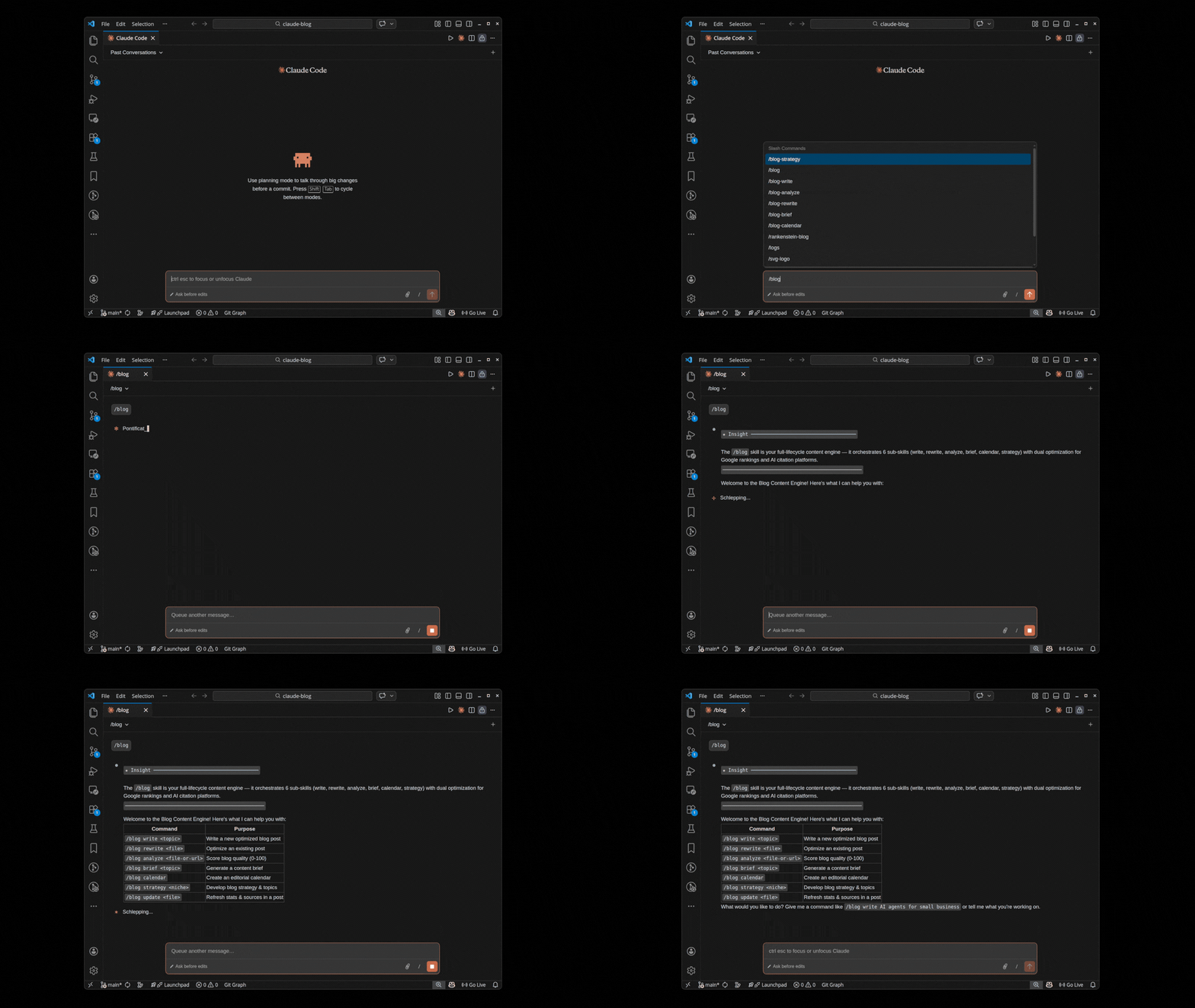
Claude Blog is a broad content-creation skill for Claude Code. Version 2.2.0 uses 31 sub-skills, 5 AI agents, and 12 adaptable templates to create, review, and improve blog posts from the terminal. The public repository has more than 1,800 stars and 300 forks as of August 26, 2026.
The standout feature is the 4-agent pipeline. Instead of generating content in a single prompt, Claude Blog runs four specialized agents sequentially: Research, Outline, Writing, and Optimization. Each agent refines the output of the previous one. The result is content that reads like it came from a human writing team, not a chatbot.
Key capabilities include:
- Blog writing (
/blog write) - Full article generation with the 4-agent pipeline - Content scoring (
/blog analyze) - 100-point scoring across 5 weighted categories - AI image generation (
/blog image) - Hero images via Gemini API - GEO optimization - AI citation readiness for Google AI Overviews, ChatGPT, and Perplexity
- Editorial workflow - Calendar planning, content briefs, taxonomy management, and fact-checking
Claude Blog is MIT licensed, completely free, and has no usage limits. If you write blog content and use Claude Code, this is the first skill you should install. Read the full tutorial on writing SEO blog posts with Claude Blog.
git clone --depth 1 https://github.com/AgriciDaniel/claude-blog.git && bash claude-blog/install.sh
2. Claude SEO - AI SEO audits
Claude SEO is the companion skill to Claude Blog. While Claude Blog handles content creation, Claude SEO handles site-wide technical SEO. It audits page speed, schema markup, meta tags, internal linking, Core Web Vitals, and more. With over 3,000 GitHub stars, it is the most popular Claude Code skill overall.
The core workflow is simple: run /seo audit on any URL and get a comprehensive technical report. The audit covers on-page SEO, technical performance, accessibility, schema validation, and mobile responsiveness. Each finding includes a severity level and specific fix instructions.
Claude SEO also generates JSON-LD schema markup, analyzes competitor pages, identifies content gaps, and monitors keyword rankings. It is particularly strong at finding issues that other SEO tools miss, like orphaned pages, duplicate meta descriptions, and broken canonical chains.
Learn more at claude-seo.md or view the GitHub repository.
git clone --depth 1 https://github.com/AgriciDaniel/Claude-SEO.git && bash Claude-SEO/install.sh
3. Claude Banana - AI image generation
Claude Banana brings AI image generation directly into your terminal. It connects to the Google Gemini API to generate blog hero images, social media graphics, OG images, and product mockups. The skill includes a 5-component prompt formula that produces consistent, on-brand visuals.
The key advantage over browser-based image tools is workflow integration. You can generate a blog post with Claude Blog, then immediately generate its hero image with Claude Banana, all without leaving your terminal. The skill outputs WebP images at configurable resolutions and aspect ratios.
Claude Banana supports 1:1, 16:9, and custom aspect ratios with resolution options from 512px up to 2K. It also handles batch generation for creating multiple image variants from a single prompt. The output integrates directly with Claude Blog's image asset structure.
View the repository at GitHub.
4. Code review skills
Several community-built skills focus on automated code review within Claude Code. These skills analyze pull requests, identify security vulnerabilities, check for common anti-patterns, and suggest performance improvements. The best ones integrate with GitHub's API to post review comments directly on PRs.
Code review skills typically add commands like /review pr or /review file. They analyze code diffs, flag potential issues, and provide contextual suggestions. Some include language-specific rulesets for Python, JavaScript, TypeScript, Go, and Rust.
The value here is consistency. Human code reviewers catch different things depending on their mood, workload, and familiarity with the codebase. An AI reviewer applies the same standards to every pull request, every time.
5. Testing and QA skills
Testing skills generate unit tests, integration tests, and end-to-end tests based on your existing codebase. They analyze function signatures, class hierarchies, and API endpoints to produce tests that cover edge cases humans often miss.
The strongest testing skills support multiple frameworks: pytest for Python, Jest for JavaScript, and Go's built-in testing package. They generate test files that follow the conventions of your existing test suite, including naming patterns, fixture usage, and assertion styles.
Some testing skills also include mutation testing capabilities, where they intentionally introduce bugs into your code to verify that your test suite catches them. This is one of the most underrated uses of AI in development workflows.
6. Documentation generators
Documentation skills analyze your codebase and generate README files, API documentation, changelog entries, and inline code comments. They read function signatures, docstrings, and usage patterns to produce documentation that stays synchronized with the code.
The best documentation skills go beyond simple docstring generation. They create structured API references with request/response examples, generate architecture decision records (ADRs), and produce onboarding guides for new team members based on codebase analysis.
7. Database and migration skills
Database skills help with schema design, migration generation, and query optimization. They analyze your existing database schema, suggest indexes for slow queries, generate migration files for schema changes, and validate data integrity constraints.
These skills are particularly useful for teams that manage complex database schemas across multiple environments. They can generate rollback migrations automatically, detect breaking changes before deployment, and produce seed data scripts for development environments.
8. DevOps and infrastructure skills
Infrastructure skills generate Dockerfiles, CI/CD pipeline configurations, Kubernetes manifests, and Terraform modules. They analyze your application structure and produce deployment configurations that follow best practices for security, performance, and cost optimization.
The most useful DevOps skills include pipeline debugging capabilities. They can analyze failing CI/CD pipelines, identify the root cause of build failures, and suggest fixes. Some also include cost analysis features that estimate cloud infrastructure costs based on your deployment configuration.
How to install Claude Code skills
Every Claude Code skill follows the same installation pattern. Here is the general process:
Step 1: Clone the repository
git clone --depth 1 https://github.com/author/skill-name.git
The --depth 1 flag performs a shallow clone, which is faster and uses less disk space. You only need the latest version of the skill files.
Step 2: Run the installer
bash skill-name/install.sh
The installer copies skill files to your Claude Code configuration directory, typically ~/.claude/skills/. It creates the required directory structure and sets up any configuration files. No additional dependencies to install.
Step 3: Verify the installation
Open a Claude Code session and run the skill's help command. For Claude Blog, that is /blog help. For Claude SEO, it is /seo help. If you see the command list, the skill is ready to use.
To update a skill, pull the latest changes from the repository and re-run the installer:
cd skill-name && git pull && bash install.sh
Choosing the right skill for your workflow
Not every skill is relevant to every workflow. Here is a quick decision framework:
| If you need to... | Install this skill |
|---|---|
| Write blog posts or marketing content | Claude Blog |
| Audit technical SEO on your website | Claude SEO |
| Generate images for blog posts or social media | Claude Banana |
| Automate code reviews on pull requests | Code review skill |
| Generate tests for untested code | Testing skill |
| Keep documentation current with the code | Documentation generator |
| Manage database schemas and migrations | Database skill |
| Configure CI/CD and infrastructure | DevOps skill |
Start with the skill that addresses your biggest bottleneck. For most content teams, that is Claude Blog. For development teams, it is usually code review or testing. You can always add more skills later since they do not conflict with each other.
The Claude ecosystem advantage
The real power of Claude Code skills emerges when you combine them. Claude Blog, Claude SEO, and Claude Banana were designed to work together as a complete content pipeline. Here is how the workflow looks in practice:
- Audit your site with Claude SEO to identify content gaps and technical issues
- Plan your content with Claude Blog's strategy and calendar commands
- Write articles with Claude Blog's 4-agent pipeline targeting those gaps
- Generate images with Claude Banana for hero images and OG graphics
- Score and optimize with Claude Blog's 100-point analyzer
- Verify SEO compliance with Claude SEO's post-publish audit
This entire workflow runs in your terminal. No browser tabs, no SaaS dashboards, no monthly subscriptions. Every tool is free, open-source, and MIT licensed. Compare that to the alternative: Jasper at $49/month, Writesonic at $16/month, and Ahrefs at $99/month. The Claude ecosystem replaces hundreds of dollars in monthly software costs with zero-cost terminal tools.
For a detailed comparison of Claude Blog against paid alternatives, see our Claude Blog vs Jasper vs Writesonic breakdown.
The ecosystem continues to grow. New skills appear on GitHub regularly, and existing skills receive frequent updates. The open-source model means anyone can contribute features, fix bugs, or fork a skill to customize it for their specific needs.
The terminal is becoming the content studio. Claude Code skills are the creative team.
Whether you are a solo founder writing your first blog post or a content team managing dozens of articles per month, there is a Claude Code skill that fits your workflow. Start with one, learn the commands, and expand from there. The entire ecosystem is free to explore.