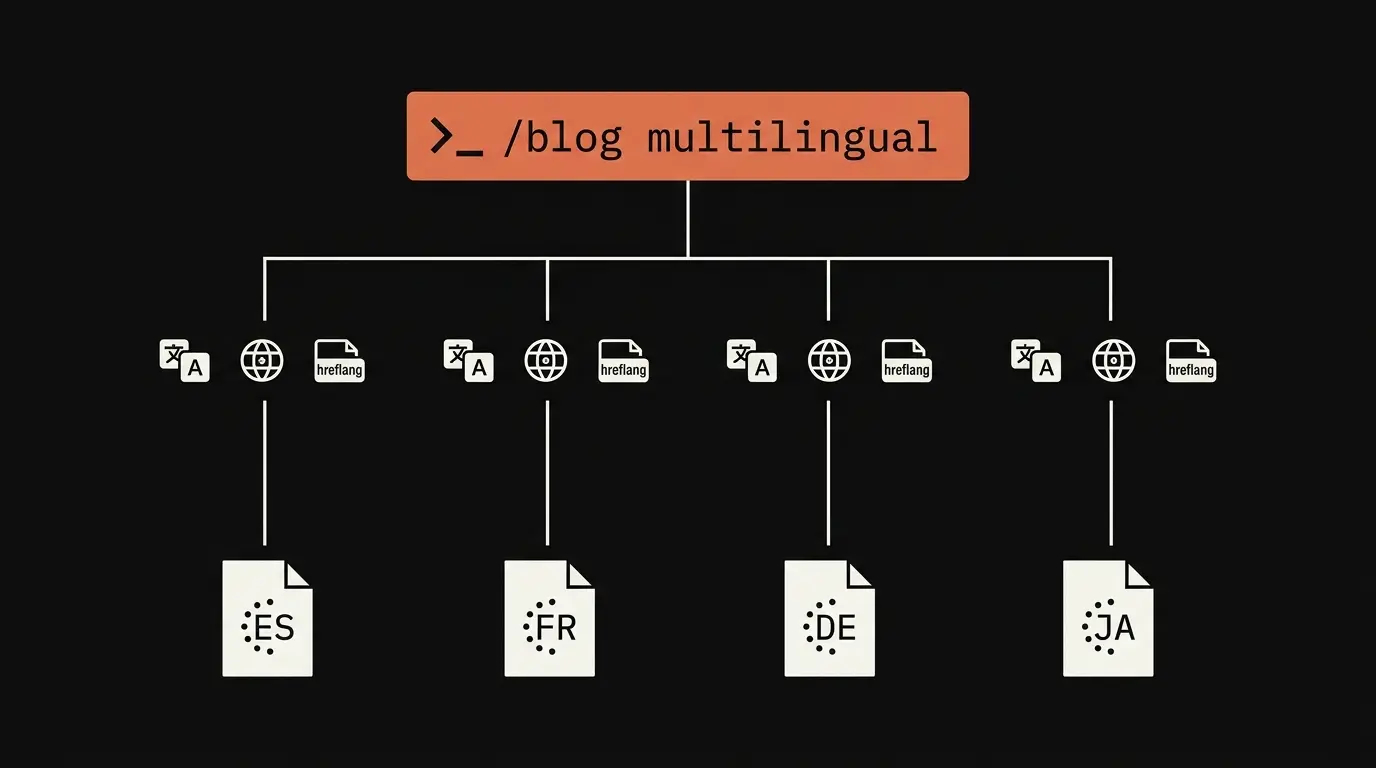
Most blogs that try to go multilingual fail at the second post. The friction stack, translate, localize, hreflang, QA, deploy, is too tall to maintain across four languages weekly. blog-multilingual collapses that stack into one command. This guide walks you through the full pipeline.
Why multilingual blogging usually fails
The failure pattern is consistent across teams of every size. It is rarely the translation itself. It is the support work around the translation that wears the cadence down:
- Translations drift from the source. The English post is updated in March, the German version still reflects the January wording in June.
- Hreflang tags break when one language gets republished out of order. The return-link reciprocity fails silently and Google quietly stops surfacing the localized variant.
- Cultural references stay US-centric in translation. A Thanksgiving anecdote in a German audience post lands flat or worse.
- Meta description length goes over 160 characters in one language but not the others. German runs long. Japanese runs short. Nobody checks until a manual audit, which never gets scheduled.
- Schema markup loses translated fields after a refactor. Suddenly only the English BlogPosting has a valid
headline. - Internal links inside translated posts still point at the English versions of the linked pages.
These problems compound. Most teams give up by post 3.
The one-command flow
Here is the full multilingual pipeline as a single invocation:
/blog multilingual "AI content scoring explained" --languages es,fr,de,ja
What that single command does, in order:
- Writes the English source post via
blog-write, with template auto-selection, sourced statistics, FAQ schema, and the rest of the standard pipeline. - Calls
blog-translatein parallel for each target language, preserving Markdown, frontmatter, schema, and code formatting. - Calls
blog-localizein parallel for cultural adaptation per region. - Calls
blog-locale-auditfor QA across all variants. - Emits hreflang tags, a sitemap fragment, and a JSON language map.
Five posts come out of one invocation: en plus es, fr, de, ja, plus the hreflang stubs ready to paste into your CMS.
What gets preserved during translation
blog-translate is a format-preserving translator, not a string-level one. It keeps:
- Markdown structure: heading hierarchy, list indentation, table cell alignment.
- YAML frontmatter keys (only values are translated, keys stay English).
- JSON-LD schema blocks, with
inLanguageset per target. - Inline SVG (text in
<text>elements is translated, geometry is untouched). - Code blocks (left as-is, never translated).
- Internal anchor structure, with anchors mapped to the target language slug.
Locale-correct formatting is then applied per target. Number separators flip from 1,234.56 to 1.234,56 for German. Dates flip from MM/DD/YYYY to DD.MM.YYYY. Currency converts from USD to EUR at the current exchange rate. Quote conventions flip from "" to „" or « » depending on the language.
What localize does that translate does not
Translation handles language. Localization handles culture. blog-localize runs after translation and applies a cultural adaptation layer:
- US idioms swap to equivalent local idioms. "Hit a home run" becomes Volltreffer in German.
- Examples get replaced. A Super Bowl reference becomes a Bundesliga reference for DACH audiences.
- Currency is converted, not just symbol-swapped.
- Imperial units convert to metric.
- Cultural taboos are flagged and avoided per region.
Four cultural profiles ship by default: DACH (Germany, Austria, Switzerland), Francophone (France, Belgium, Quebec), Hispanic (Spain plus Latin America), and Japanese. Custom profiles are defined in YAML so you can add Brazilian Portuguese, Polish, or anything else your audience demands.
Hreflang generation
Hreflang is where most do-it-yourself multilingual setups break. blog-multilingual emits bidirectional tags where every variant references every other variant plus an x-default. Output is delivered as ready-to-paste HTML and as a sitemap.xml fragment, depending on what your CMS prefers:
<link rel="alternate" hreflang="en" href="https://blog.example.com/post" />
<link rel="alternate" hreflang="es" href="https://blog.example.com/es/post" />
<link rel="alternate" hreflang="fr" href="https://blog.example.com/fr/post" />
<link rel="alternate" hreflang="x-default" href="https://blog.example.com/post" />
Every page references all alternates including itself. Every relationship is reciprocal. x-default points to the source-language version. Protocol and trailing-slash conventions stay consistent across the set.
Locale-audit as ongoing QA
blog-multilingual runs blog-locale-audit once at publish time. Content drifts after that. The recommended cadence is to run the audit weekly across your content directory:
/blog locale-audit ./content/
The audit reports three classes of issue: completeness gaps (English post updated, German translation stale), hreflang breakage (a return tag missing after a slug change), and meta parity (a target-language title that runs over 60 characters when the English fits under).
Cost model
Translation and localization use the Gemini API. The free tier supports tens of thousands of characters per day, enough for most weekly publishing schedules. Premium tier is roughly $0.04 per 1000 tokens for translation work.
A typical 1500-word post in four languages costs about $0.30 to translate and localize end to end. Compare that to human translators at $0.10 to $0.30 per word: a 1500-word post across four languages is $150 to $450 in human-translator costs alone, before localization, hreflang setup, or QA.
End-to-end example
Walking through producing a four-language version of an existing post:
- Run
/blog multilingual "topic"to start from a topic, or/blog translate ./content/post.md --to es,fr,de,jawhen the source post is already written. - Inspect the outputs in
./content/<locale>/post.mdfor each target. - Run
/blog locale-audit ./content/to verify completeness and hreflang. - Deploy. The deploy step is CMS-specific: WordPress via the Polylang plugin, Astro via the i18n routing config, Next.js via App Router locale segments.
WordPress users will paste the hreflang HTML into a Polylang language switcher template. Astro users add the language codes to astro.config and let the i18n routing handle URL prefixes. Next.js users place files under app/[locale]/blog/ and reference the JSON language map from the layout.
Conclusion
The goal is a sustainable multilingual blog cadence, not a one-time stunt. blog-multilingual makes the cost of an extra language a flag, not a hire. Run it on your next post and see how the friction stack collapses.
About the author
Daniel Agrici is an AI automation specialist based in Chisinau, Moldova. Creator of Claude Blog and 20+ open-source repositories with 4,900+ combined GitHub stars. GovTech Hackathon Moldova 1st place winner. Find him on LinkedIn, YouTube, and GitHub.